Advertise Here

Support our Sponsors

Saturday, February 22, 2014

Download Flash Player 13 Offline Installer Direct Download Links

Flash Player is an essential add-on for any Internet user who wants to view rich multimedia content on the Internet such as videos from popular video sharing sites like Youtube, Vimeo etc.

If you are a Windows 8 or Windows 8.1 user, you will get the latest update of Flash Player through Windows Updates. To see the latest version of Flash Player installed in your system, you may go to Control Panel –> Flash Player and then go to Advanced tab to view the version of Flash Player installed in your system.

Flash Player settings in Windows 8.1

At the time of this writing, Flash Player 13 is still in beta but nothing in the post will change except if change log of version 13 changes abruptly. For an end-user, the new feature in Flash Player 13 is that the “Press ESC to exit full screen” message has been moved to the top of the screen to make it comfortable for the user.

Currently, this setting only works for hardware accelerated videos such as Youtube videos etc. We will see this work everything hopefully in the final release.

You may want to read the release notes for Flash Player 13.

Flash Player 13 stand alone installer links

Flash Player 13 for Internet Explorer (Windows EXE installer)

Flash Player 13 for Other Browsers (Windows EXE installer)

Flash Player 13 for Other Browsers (Mac OS X DMG installer)

Flash Player 13 stand alone installer for Windows 32-bit

Flash Player 13 stand alone installer for Mac 32-bit

Office 2013 Language Packs Direct Download Links (All Languages)

You may download Office 2013 language pack of your choice by clicking the links below.

Arabic 32 bit

Arabic 64 bit

Bulgarian 32 bit

Bulgarian 64 bit

Chinese, simplified 32 bit

Chinese, simplified 64 bit

Chinese, traditional 32 bit

Chinese, traditional 64 bit

Croatian 32 bit

Croatian 64 bit

Czech 32 bit

Czech 64 bit

Danish 32 bit

Danish 64 bit

Dutch 32 bit

Dutch 64 bit

English 32 bit

English 64 bit

Estonian 32 bit

Estonian 64 bit

Finnish 32 bit

Finnish 64 bit

French 32 bit

French 64 bit

German 32 bit

German 64 bit

Greek 32 bit

Greek 64 bit

Hebrew 32 bit

Hebrew 64 bit

Hindi 32 bit

Hindi 64 bit

Hungarian 32 bit

Hungarian 64 bit

Indonesian 32 bit

Indonesian 64 bit

Italian 32 bit

Italian 64 bit

Japanese 32 bit

Japanese 64 bit

Kazakh 32 bit

Kazakh 64 bit

Korean 32 bit

Korean 64 bit

Latvian 32 bit

Latvian 64 bit

Lithuanian 32 bit

Lithuanian 64 bit

Malay 32 bit

Malay 64 bit

Norwegian, Bokmål 32 bit

Norwegian, Bokmål 64 bit

Polish 32 bit

Polish 64 bit

Portuguese (Brazil) 32 bit

Portuguese (Brazil) 64 bit

Portuguese (Portugal) 32 bit

Portuguese (Portugal) 64 bit

Romanian 32 bit

Romanian 64 bit

Russian 32 bit

Russian 64 bit

Serbian, Latin 32 bit

Serbian, Latin 64 bit

Slovak 32 bit

Slovak 64 bit

Slovenian 32 bit

Slovenian 64 bit

Spanish 32 bit

Spanish 64 bit

Swedish 32 bit

Swedish 64 bit

Thai 32 bit

Thai 64 bit

Turkish 32 bit

Turkish 64 bit

Ukrainian 32 bit

Ukrainian 64 bit

Vietnamese 32 bit

Vietnamese 64 bit

[via itechtics]

If multiple people help manage my FB Page, how can I see who posted something?

On a FB Page post, the name of the person who posted will be listed below the name of your Page next to Posted by. On a Page comment, the name of the person who commented will be listed below the comment next to Commented on by. Keep in mind that only people who help manage your Page can see this information.

You can also see who posted or scheduled posts in your Page's activity log. Learn how to remove yourself or another person who has a role on your Page.

Note: This information will only be visible on posts or comments created on or after February 20, 2014. This feature is now available to everyone right now.


Wednesday, February 12, 2014

Tip: Give Your Android Phone A Windows 8 Styled Makeover


tip_android_windows_8_makeover

Fan of Windows 8 on your computer, but still stuck with an Android phone for some reason? Or want to give someone you know that uses an Android device a taste of what they are missing?

There are a number of simple tricks you can use to turn your Android tablet or phone into a pocket sized Windows 8 PC — or something close to it. For starters, you can install mobile versions of familiar desktop software. But the most visible change is by downloading a Windows 8 styled home screen.

Android phones, this side of HTC, have a bit of a tendency to look identical.

If you want to give your Android device a Microsoft makeover, then the best way to do so is by installing this amazing app launcher that goes by the name of Launcher 8 Free.

It lets you customize your home screen with colorful tiles similar to the ones you get on Windows 8. These provide quick and easy access to not only your messages and contacts but settings and other essentials tools with just a tap.

You can also add in more widgets and apps that you frequently use to the home screen.

Customization options are aplenty too. Just long-press a tile and you will be able to change its size and color, move it around or remove it altogether — not all that different to what is available on devices and computers powered by Windows 8 and Windows Phone 8.

Launcher 8 Free not only looks fantastic, it also makes it easy to switch back to the standard Android home screen when you want. It is also highly rated and downloaded on Google Play.

You can download Launcher 8 Free here.


Monday, February 3, 2014

How to Recover Deleted Applications on your iPhone

Deleting and installing applications on your iPhone is super easy. Thanks to a large collection of applications in the App Store, most of the power users may even forget about an application they had on the device and ended up deleting it. However, one fine moment you recall that amazing application and want it, but there is absolutely no way to recall what the application name was. No matter how much you explore around, it becomes impossible to trace the application.

iOS App recoveryHowever, thanks to iCloud a lot of these things have been streamlined and you can actually now go back and find the application that once you have downloaded  with your iTunes account. This is extremely easy to do with your device running iOS 7. Just follow the following steps:

Step 1:

Recover Deleted Apps  1Open The App Store icon from your Springboard.

Step 2:

Recover Deleted Apps  2Click on the Updates Tab.

Step 3:

Recover Deleted Apps  3Once you are in the Updates tab, click on Purchased tab.

Step 4:

Recover Deleted Apps  4When you are in Purchased tab, click on ‘Not on This iPhone’. And this is where all the applications that you must have downloaded with your iTunes ID.

Conclusion

It is that easy to retrace the applications that you had once downloaded with your iPhone or any other iDevice. It is a rather full proof method that works great and in our experience records every single application that you have downloaded.

In case you have any questions or doubts regarding this method, feel free to post to us in the comments section below or ask us on our Social Networking profiles and we would be glad to answer.

Saturday, February 1, 2014

Microsoft extends virus warnings for Windows XP to 2015

Microsoft has decided to continue providing virus warnings for the ageing Windows XP operating system until 2015.

The warnings were due to end on 8 April 2014 when all other support for the software is scheduled to stop.

However, the numbers still running the 12-year-old operating system convinced it to provide more help.

About 30% of all desktop computers are still running XP, according to figures from research firm Net Applications.

Microsoft explained its change of policy in a blogpost saying the feed of security information was the only support XP users would receive after 8 April this year.

This would mean that it continued to provide signatures for well-known malicious programs that will help Windows XP spot when viruses, trojans and other cyber-threats try to compromise a PC. The malware-spotting updates will be provided for Microsoft's Security Essentials and for a wide variety of corporate tools used to protect large numbers of PCs.

These security updates will be produced until 14 July, 2015.

However, security patches, regular updates and bug fixes for XP will stop as scheduled on 8 April.

In its blogpost, Microsoft warned users to stop using XP to ensure they stay safe.

"The effectiveness of anti-malware solutions on out-of-support operating systems is limited," said Microsoft. "Running a well-protected solution starts with using modern software and hardware designed to help protect against today's threat landscape."

Despite its age, Windows XP has proved to have a long life on desktops in homes and businesses. This led Microsoft to keep selling it long past the date it was due to be removed from shop shelves.

This longevity is partly because of the poor reception that its successor Windows Vista received and because some businesses have found it hard to adapt to the changes introduced in Windows 7 and 8.

How to access YouTube via Tune.pk in Pakistan Without Any Proxy Software

It’s been more than a year since YouTube banned in Pakistan and all you have to do is to use VPN/Proxy services but not anymore. A group of Pakistani developers came up with a unique Chrome extension that lets you play any YouTube video in Pakistan without connecting to any VPN/Proxy service. Want to know how?

How to install and use Tune.pk Chrome extension.

Step 1:

Download Tune.pk Chrome Plugin file from here. This extension of Tune.pk only works with Google Chrome and not any other browser.

Step 2:

Now open your Google Chrome Browser and go to Tools >> Extensions (Fig1), now when the extension page is opened all you have to is drag the downloaded file in Extension Manager page and your Tune.pk Chrome Plugin will be added and ready to work.

Figure 1:


 Step3:

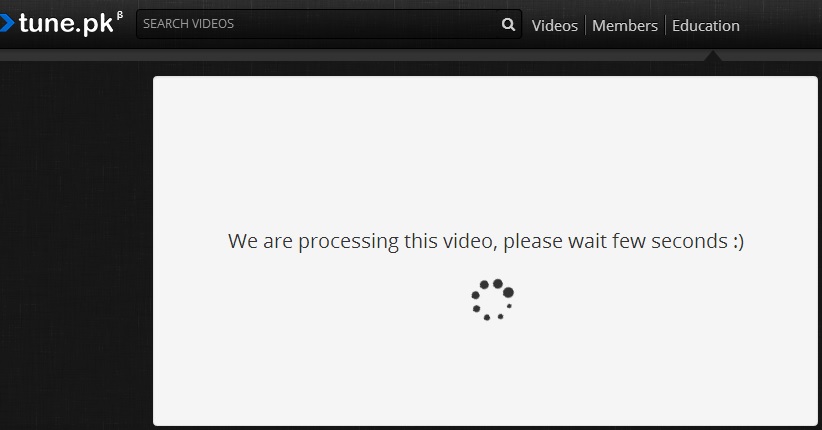
Now that the Tune.pk Chrome Plugin is installed in your Chrome browser, open any YouTube link of the video in Chrome browser and magically you will be redirected to the Tune.pk and after processing of few seconds the video will be at your disposal to watch and share. It’s that easy and simple. The processing time can be increased depending on the duration of the video though.

In the end I would like mention few steps you can follow to initially test the plugin.

1.       Open Google.com
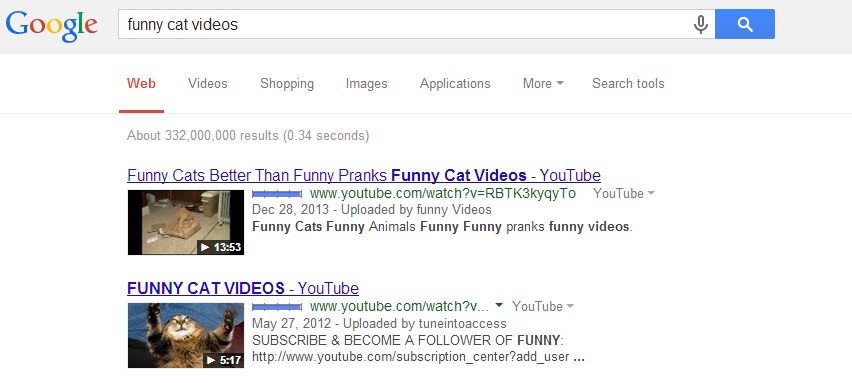
2.       Search “funny cat videos” on Google(Fig2) for example
3.       Click on any video link and you will be redirected to tune.pk straight away and video will be available after processing (Fig3 & Fig4)

Figure 2:

Figure 3:

Figure 4:

Hope this article will help you installing the plugin, if the screenshots are confusing please also watch the below video. If still facing problem installing, leave your comments down and we will address your issue.

This entry was posted via tune.pk blog

Get Thousands of Visitors for Your Website

autosurf

Get Free Dot Tk Domain

Earn Money by Just Shortening URL