Advertise Here

Support our Sponsors

Wednesday, February 26, 2014

Microsoft Office 2013 Service Pack 1 (SP1) Released, Download Link Inside


Good news for Office 2013 users. Microsoft has released the first Service Pack "SP1" for Office 2013 suite.

SP1 for Office 2013 comes with new updates to improve security, performance and stability of Office 2013 programs. This service pack already contains all previously released updates for Office 2013 suite.

List of improvements by SP1 that are worth to mention:

  • Compatibility improvement with Windows 8.1.
  • Compatibility improvement with Internet Explorer 11.
  • Compatibility improvement with modern hardware.
  • Provides new apps for Office capabilities and APIs for third-party developers.
  • Provides support for task pane apps in Outlook 2013.
  • Provides ability to insert and use content apps in PowerPoint 2013 slides.

SP1 for Office 2013 is available for both 32-bit (x86) as well as 64-bit (x64) editions of Office suite. SP1 is also available for Microsoft Project 2013, Visio 2013 and SharePoint Designer 2013 programs.

Office 2013 Service Pack 1 is already available on Windows Update. If you want to download its standalone offline installer, you can download it using following links:

Download Office 2013 Service Pack 1 (SP1) 32-bit

Download Office 2013 Service Pack 1 (SP1) 64-bit

Download Project 2013 Service Pack 1 (SP1) 32-bit

Download Project 2013 Service Pack 1 (SP1) 64-bit

Download Visio 2013 Service Pack 1 (SP1) 32-bit

Download Visio 2013 Service Pack 1 (SP1) 64-bit

Download SharePoint Designer 2013 Service Pack 1 (SP1) 32-bit

Download SharePoint Designer 2013 Service Pack 1 (SP1) 64-bit

Download Office 2013 Language Pack Service Pack 1 (SP1) 32-bit

Download Office 2013 Language Pack Service Pack 1 (SP1) 64-bit

Office 2013 SP1 can be installed in Windows 7, Windows 8, Windows 8.1, Windows Server 2008 R2, Windows Server 2012 and Windows Server 2012 R2 operating systems.

We hope that Microsoft fixed following annoying issue in Service Pack 1:

Fix Blurred Font and Cursor Hanging Problems in Microsoft Office 2013

[via askvg]

--

Tuesday, February 25, 2014

advertise space available as fb cover page


advertise space available as fb cover page... message us for details.. thanks check facebook page http://www.facebook.com/myjobsdottk


Bitdefender Mobile security Premium free 1 Year License

Bitdefender Mobile Security Premium will keep your Android device protected against viruses, without affecting your battery life. It works so seamlessly with Android, you’ll hardly know it’s even there!
Good news for Android users who wish to keep their device secure & safe, Bitdefender is offering a one year License  of Bitdefender Mobile security Premium (Android) free for over a limited time period.

Bitdefender Mobile security Premium or Bitdefender Mobile Security & Antivirus is a light weight security suite for Android devices that protects the device from both online & offline security threats with less impact on system battery.

Bitdefender Mobile security contains four tools or modules : Malware Scanner, Privacy Advisor , Web Security and Anti-Theft.

Bitdefender Mobile security Premium

The Malware Scanner tool allows you to scan for malware or viruses and malicious apps on your Android, if the scanner detects any malware on your device, it will be listed and provides an option to remove or uninstall malicious apps. The option “Scan storage on mount” (re) scans your phone’s storage every time it is mounted, such as after it is connected to a computer or replaced.

Privacy Advisor gives you detailed info about what your installed apps are doing in the background without your knowledge. It even provides a score reviewing your application based on the danger level of their clues. If thr Privacy score is lower , it indicates there are some dangerous apps installed on your device that you should take care off.

When the Web Security tool is turned on, it will keep you safe against rogue/malicious sites and their traps while you browse the Internet, no matter what browser you use : chrome or default Android browser.

Whenever you access a site that contains phishing, fraud, malware or simply isn’t trusted, Web security module kicks in to warn you about it.
The Anti-Theft tool helps you to find misplaced phone or tab, when this module is activated you can remotely track your lost device and lock it or even prevent your sensitive data falling into the hands of bad by wiping your Android device.

Anti-theft tool module is categorized into two parts: Web control and SMS control. Through Web control, in case the device gets lost or stolen, you can use all the Anti-Theft features (remote locate, lock and wipe) from my.bitdefender.com and all you need is the PIN number that you created.

SMS control will work on Android phones or tabs with GSM hardware, for this you have to choose a ‘trusted phone number’ for the SMS command service. The trusted number will receive notifications when the SIM card in the phone is changed, and is also the only number allowed to issue the WIPE command through SMS. But make sure you enter the phone number along with country code , for instance in India you must start with +91.

For effective functioning of Bitdefender Mobile Security & Antivirus app, make sure bitdefendermobile security is fully configured:
1. Set up a password for Anti-Theft
2. Review the available SMS commands,
3. Use the mybitdfender console,
4. Test the call-me-back feature

Bitdefender Mobile Security & Antivirus Free 1 Year license:

Note : Refer Update 2

To get a 180 day license of Bitdefender Mobile security Premium , just visit this Bitdefender one million install promo page, then enter your email address & captcha code .You will receive the license key worth $5 from Bitdefender with in a few minutes, copy the activation code.

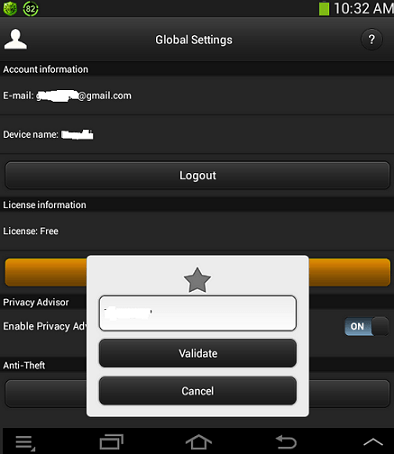
Now install the Bitdefender Mobile Security & Antivirus on your device through Google play, launch the app and tap the ‘ upgrade to premium’ option, you will be forwarded to Google wallet for payment, cancel it.On cancelling the payment, you will be directed to apps ‘ Golbal settings’,  tap on “Extend Premium plan” and select the option I already have a key, then enter the license key you received.

Update :  The Promo has been re-launched, now this promotion will end on December 23, 2013.

Update 2 [February 25/2014]  : Above promo has expired, but now you can get one year license of Bitdefender Mobile security for free with German Facebook fan page, just visit this link  , then  hit the ‘Like’ button, enter your email address and click on the “kostenlose lizenz” button.

With in few seconds, you will receive a email from Bitdefender with the license code for the Mobile security , copy the license code  (Der Lizenzschlüssel ist) and get the app from Google play or from above link, then use the code as specified in update 1.

Tip: It seems the same license key can be used on many devices, I activated the app on 3 devices with the same code.

Bitdefender Mobile Security & Antivirus license key

[via techno360]
--

Get Panda Cloud Antivirus 2.9 Beta

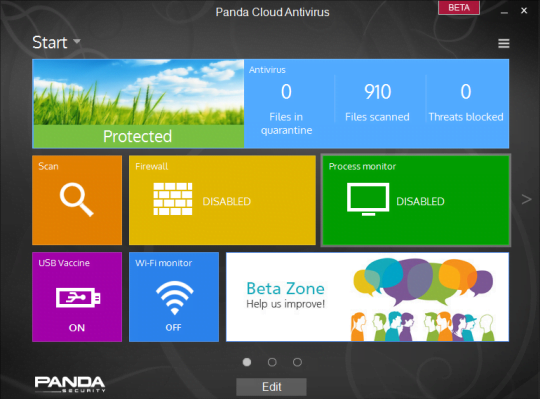
Today Panda Cloud Antivirus 2.9 Beta  has been released, it arrives with  a redesigned interface and  new Wi-Fi Monitor  feature.The developer Panda software has announced that  this beta version has several important changes and improvements.The major change you will notice is the re-designed  interface,  now the Panda Cloud Antivirus  has a new modern design and intuitive inspired  by Windows 8.1 OS UI.
 
The new-interface also allows users to customize the layout, similar to android mobile home screen , you can slide and move the module from one screen to another screen in the main panel. The main panel of the app has 3 screens to slide, where you  allocate your preferred modules, for instance you can drag the ‘Firewall’ tile to the end of the  first screen and  can place  it on the second screen.
 
Panda Cloud Antivirus 2.9 Beta
 
The new feature available in this version is ‘Wi-Fi Monitor’,  this feature will let you know when some one tries to steal your Wi-Fi or tries get access to your network. Wi-Fi monitor will show a list of devices currently connected to your network and this will help you to point out the intruder accessing your  Wi-Fi network.
 
panda cloud antivirus 2.9
 
According to the developer, these new features and changes will be available to the public with launch of next major version , Panda Cloud Antivirus 3.0.This beta version is lighter and safer,furthermore greatly enhancing the protection capacity and product performance. But as this is a beta version, one should know that some issues may appear and its up-to the users to decide whether to try this beta or not. 

“The role of beta versions is fundamental in shaping and developing the final product. Only by listening and interacting with the users, we can deploy improvements and suggestions ,finally building a best solution that meets the needs of our user community, “said Alberto Anon, Product Manager of Panda Cloud Antivirus.

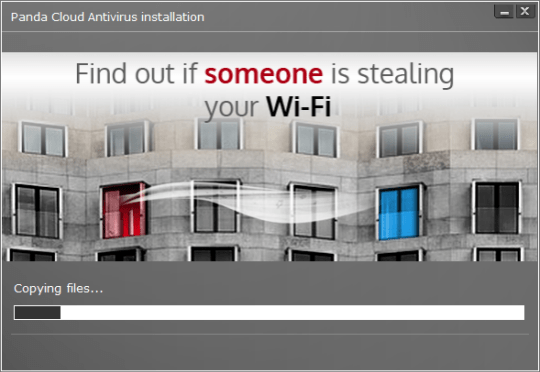
panda cloud antivirus installation
Note: During the installation of this beta, un-check the options, ‘Panda Security’ toolbar, ‘MyStart’ as default home page and set ‘Yahoo’ as default search provider in browsers.
 
Panda Cloud Antivirus is one of the best free security solution provider, it offers a firewall with intrusion protection (IDS), immunization of USB drives and a strong cloud-based antivirus engine protecting against malicious content.
 
According to latest assessment and certification by AV-Test (Independent IT-Security Institute),Panda Cloud Antivirus has been regarded as the best free security solution. The product has earned the highest score in the areas of protection (6/6) and usability (6/6) without a single false positive. Panda Cloud Antivirus obtained the maximum score in two of three areas (protection and ease of use) against 25 free and paid security solutions. 

“We are aware that we must continue to evolve our Antivirus solution to keep the trust of our customers. A sample of this continuing evolution are the excellent results obtained in recent comparative tests conducted by AV-Test, which stands out as Panda Cloud Antivirus best free security solution, “said Alberto Anon.

Download : Panda Cloud Antivirus 2.9 Beta

[ via techno360]

Android Finally Arrives on Nokia with the Nokia X, X+ and XL

“It’s familiar but oddly very different” reads the headlines on one of the leading tech blogs after Nokia unveiled what was the worst kept secret perhaps in the recent tech history. Yes, Nokia finally unveiled three devices all of which run a forked or custom Android on it. While the world had expected just one Android device, dare we say Nokia tripled the joy of it’s fans by announcing three phones in the Nokia X family which run AOSP.

Nokia X

The devices will focus on the emerging markets which reflects in it’s specs. The Nokia X will go on sale immediately, while the Nokia X+ and Nokia XL will be available in Q2. The Nokia X phones are in a way a hybrid of Asha, Lumia and Symbian devices. Stephen Elop also categorically mentioned that these devices will always be priced one category lower than the Lumia devices. Unlike any other Android phone, the Nokia X series does not come with Google Play Store though it runs Android apps. There are other stores such as proprietary Nokia Store, Yandex or even Amazon appstore for you to pick your favorite Android apps from.

The Nokia X will retail for 89 Euros, the Nokia X+ will cost you 99 Euros while the Nokia XL will hit your wallet by 109 Euros

Nokia X1

The first phone in the family is the Nokia X which has a 4 inch display with WVGA resolution. It runs a heavily customised Android version 4.1. There is 512 MB RAM on board and 4 GB ROM though, expansion via Micro SD is possible. The device has a fixed focus 3 MP rear camera and no front facing camera. The phone will come with services such as OneDrive, Skype etc in built and also brings Fast lane, a quick way to view your notifications and apps from the Asha device.

If you haven’t check out our views on the Nokia X, you can read them here 

The other two phones announced were the Nokia X+ and the Nokia XL which are basically small upgrades on the Nokia X. The Nokia X+ is the same device as the Nokia X but with 768 MB RAM and comes with a bundled 4 GB Micro SD card. The Nokia XL on the other hand is a slightly bigger device with a 5 inch display and a 5 MP rear camera and a front facing camera too. The device is powered by a 2000 mAh battery. The UI of the phone, at least on videos looked pretty slick and heavily inspired from the Lumia line. You have similar tile like experience and there is no particular app drawer.

All the three devices are dual SIM supported and have 3G connectivity while using Micro SIMs.

[via techsplurge]

A Galaxy S5 or 5S ? Samsung Introduces Fingerprint Scanner as it unveils the all new Samsung Galaxy S V

It was the most anticipated, hyped and talked about press event at the MWC 2014. Samsung took the stage in Barcelona to announce it’s latest flagship device, the Galaxy S V in a very typical dramatic Samsung fashion. After what was a not so successful launch of the Galaxy S IV, Samsung learnt its lesson well and there were no radio plays involved at least, though yes, there was plenty of orchestra. It was closer to what you would expect from a tech launch. So, let’s quickly dive into what the latest and greatest Galaxy device has brought to the shelf for 2014.

The Design is distinctively Different

Galaxy S V1

The first noticeably difference between the Samsung Galaxy S V and rest of the Galaxy family is the design aesthetics of the back of the device. The front and the side metal trims remain the same though. Gone are the plastics, and gone are the stitched faux leather backs and have been replaced by a pseudo metal like but still plastic back with dimples. The device is a water and dust resistant too with IP67 rating. Taking cues from the hugely popular Touch ID on the iPhone 5s, Samsung has, as expected, bought a fingerprint scanner to the Samsung Galaxy S V. It is weird how Samsung has decided to implement this as you have to basically swipe your finger across to log into the device.

The device has a slightly larger display at 5.1 inches which is a 1080P display with Super AMOLED panel. Just beneath the home button, there are two capacitive buttons, a menu button and back button. There is USB 3.0 on board, just like the Note III.

The Specifications as expected are bumped

Galaxy S V

Any flagship device is expected to bring the latest and greatest specifications. And the Galaxy S V is no different. The device features a 16 MP rear camera with the capability to shoot 4K videos. The device has an LED flash as well as a heart rate sensor on the back where if you place your finger for about 5-6 seconds, the device will record and give information about your heart beat.

Internally, the device runs a 2.5 GHz Quad Core SoC which makes the device last at least 20% longer thanks to better battery management. There is 2 GB RAM on board to keep the experience lag free. The device comes with 2800 mAh removable battery.

The Software feels familiar but with useful add ons

Galaxy S V2

The Samsung Galaxy S V runs Android 4.4.2 KitKat. The Touchwiz skin looks very similar to what we have seen on the previous devices such as the Galaxy S IV and Note III. The major difference is in the notification drop down menu, where icons are changed to more rounded ones. There is also a health tracker which is widely improved from the last time. The device brings a dedicated fitness coach to help you stay fit by calculating the number of steps you have taken, calories burnt etc. There is also a new unlocking effect which is based on prism effect of diamonds.

The device also brings a magazine UI when swiping from left to right when on the home screen. This is basically a collection of all your news and social feeds which we had seen on the Note III by swiping up from Home Screen. Samsung also claimed that the device is the fastest AF Camera in the world at .3 sec. The device also has HDR mode for video, which is another first. The Galaxy S V also comes with Ultra Power Saver mode which turns the display of your device to black and white keeping only essentials like SMS and Call there making sure your device lives longer.

Availability, price and your options

The Samsung Galaxy S V is expected to go on sale starting April 11 in 150 countries. Samsung confirmed that they will be supporting designer backs and several newer colors will be made available in due course. To start with though, in the US at least, the phone will be available in the shimmery white and charcoal black color. The device will come with both 16 and 32 GB variant and both of them will have Micro SD card expansion. There was no official word on the pricing, though we will update you when that happens.

[via techsplurge]

Monday, February 24, 2014

Wi-Fi Inspector : Free application for monitoring Wi-Fi networks

The Xirrus Wi-Fi Inspector is a powerful tool with built-in tests enabling you to characterize the integrity and performance of your Wi-Fi network. You can easily gain visibility into your network with this application, which is designed to run on Windows XP, Vista or Windows 7 laptops.

Highlights:

  • Simple tool for monitoring Wi-Fi networks
  • Runs on Windows 7, Vista or XP
  • Free of charge and easy to install software
  • Real-time monitoring of wireless network status, traffic and clients
  • Detect Rogue APs

Benefits:

  • Ensure high performance of your network
  • Reduced IT burden with easy to use troubleshooting tools
  • Enhance security by eliminating rogue APs
  • Provide peak Wi-Fi network performance


Get Thousands of Visitors for Your Website

autosurf

Get Free Dot Tk Domain

Earn Money by Just Shortening URL